Toris Studio Retrospective: Local TTS and Video Verification as One Workflow
The Toris Studio workflow from making ClubLog videos and Shorts: scene data, local Qwen3-TTS, per-format editing, audio and output checks, and the line between publish prep and publishing.

Joohwan Yu · Founder, Full Stack Developer
Toris · Published
Contents
While building Toris Studio, the thing I came to care about more was the work after generating a video. I had to fix the script, change the voice, review the result, and prepare it for a platform. Only when that chain held together could I make the next video. That connection was closer to a development problem than the generate button was.
On October 1, I asked for keywords and post copy so the ClubLog promo video could go up on Threads, Instagram, and YouTube Shorts. The record from that time says the copy, cover, and metadata were ready, but the connections needed for posting were not in place. What was confirmed was publish preparation, and actually publishing was a separate matter.
This post is based on the working conversations from September 30 to October 2, 2026. I treat the execution results of the ClubLog voice replacement and the roughly 58-second Shorts production as limited to what was reported at the time, and I checked the work structure against the project code and documents.
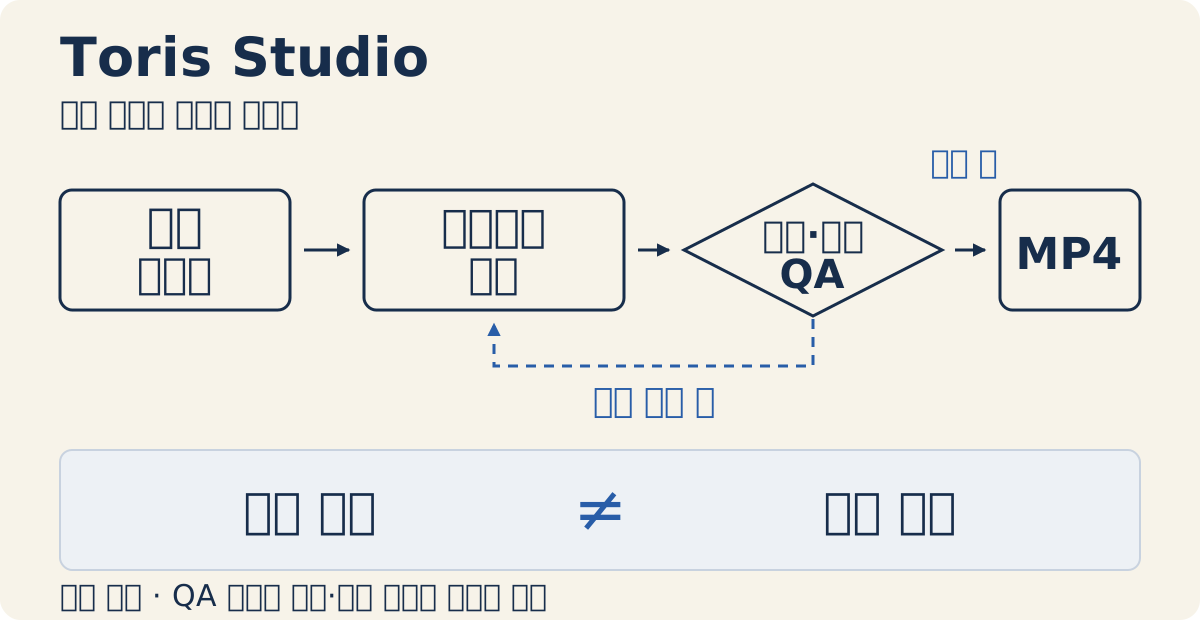
This is a conceptual diagram explaining how the pieces relate, not the actual editor screen. It does not show the completion status of generation, verification, or publishing.
I separated what to show, what to read aloud, and the evidence
In a scene, I kept the on-screen title and description, the narration, the source, and the media separate. I also distinguished a scene’s role from its layout. Even for the same evidence scene, whether to show the product screen large or place it next to the explanation was a separate choice.
This separation matters for managing the scope of edits. Shortening an on-screen title doesn’t mean regenerating the audio. Strengthening a source doesn’t mean changing the pacing of the narration. If you put everything into one block of script, it’s hard to trace which edit affects which output.
| Scene input | Role it handles | What to check separately |
|---|---|---|
| On-screen text | The key point to read and understand | Is it readable on a small screen |
| Narration | Explanation heard by ear | Are pronunciation, pacing, and sentence length appropriate |
| Source | Evidence for a claim | Does the material actually support that sentence |
| Media | Product screens and visual explanation | Does the actual file exist, and does its content match |
The same distinction was needed for pronunciation. In the Shorts production record, there was a stretch where an English product name wobbled when synthesized as is. The fix was to keep the official spelling on screen while using a Korean pronunciation spelling for the voice input. I handled on-screen accuracy and the clarity heard by ear as different inputs.
The scope of what to save for reproducibility also mattered. The project JSON doesn’t include the media files, so I have to keep the scene data together with the audio and images it references. If the data survives but the files are gone, the next edit can’t continue.
Changing the aspect ratio was different from shortening the story
While supporting landscape, portrait, and Shorts, what I paid attention to was scene structure more than resolution. A short promo video moves quickly through a hook, a benefit, the actual product screen, and a call to action. A long video has room for background and the problem, explanation, evidence, and limitations.
Even if you switch to a vertical screen, the order of a long explanation stays. The format button in the current editor changes the screen format and does not automatically rewrite existing scenes into a new script. Per-format scene structure is chosen separately in templates. Choosing a format and editing what to keep had to be done separately.
The Shorts production document also records the direction of compressing the source into a few topics rather than listing all of it. Editing a short video started from a judgment about reducing the amount of information, not font size.
The Linux production record also has a case where a new explanation scene in a long video lacked narration and was classified as a draft for review. The file rendering and the length growing did not make it a postable video. When looking at the results of a format conversion, you have to check for gaps like this too.
Installing local TTS gave me a server to operate
The Mac default setup I confirmed usage for after installing is Qwen3-TTS 1.7B CustomVoice 8-bit, MLX, Sohee, Korean. The synthesis API saves a WAV per scene and returns the actual audio length, and the editor adds some buffer time to that length to set the scene length. Qwen3-TTS’s own Korean support and the Sohee voice can also be checked in the official model docs. The MLX and 8-bit setup is a local-run choice in my project, and this post does not confirm that the server is currently running.
What I asked again after installing was also how to start and stop the server. That question shows the operating burden well. The model being local and the synthesis service running are different states. Even with the Studio screen open, if the voice server is shut down, synthesis jobs don’t proceed.
The current run entries include install and start scripts, but there are no dedicated package commands for stop, status check, or restart. Beyond the install guide, whether it’s running and how to shut it down should be part of the usage flow. A status-check response coming back also can’t be taken as verification that actual sentence synthesis works.
Keeping it resident is a choice to reduce loading the model every time, but it also adds one more process to manage. I have to handle model downloads, dependencies, server state, logs, and generated files. Choosing to reduce external voice API calls didn’t remove the operating burden.
Moving environments is also an open problem. The Linux document distinguishes editing and rendering from synthesizing new audio. There is a path for bringing in existing audio, but a replacement synthesis setup has not been verified. I decided not to generalize the Mac local setup as working as is in other environments.
I check pronunciation, audio, and the final file separately
The ClubLog voice replacement record says I re-synthesized from the original script and checked the transcription with local speech recognition. When the original text exists, there is no reason to treat the speech recognition result as the new original. Transcription is an aid for finding suspicious stretches.
The review I settled on has three layers.
- Content and pronunciation: Check brand names, ticker or stock names, numbers, and loanwords against the original script. Even if the recognition result is right, fix it if it sounds unnatural when I listen directly or if words are missing.
- Audio and editing: Check whether sentence endings get cut off, whether long silences appear, and whether the volume jumps. Also line up subtitle timing with the actual speech.
- Final file: Check that the whole MP4 to be posted decodes normally and is the same output as the file I reviewed.
Preview playback and final MP4 verification are also different. Remotion provides a Player preview inside React and a video file render API. Just because I put both into the workflow doesn’t mean one succeeding guarantees the quality of the other.
There is also a record that when replacing the voice, I kept the already-made visuals and swapped only the audio. What to compare then is the video stream, not the hash of the whole file. Since the audio changed, it is normal for the whole file to differ. That said, this doesn’t mean you can skip re-encoding the visuals in every edit.
The three checks can’t substitute for one another. The current automatic quality score also only checks things like whether audio is connected and script density, and does not judge pronunciation accuracy. Audio can be cut off even when pronunciation is right, and script errors can remain in a file that decodes. Instead of a single success mark, I had to leave what was checked and by what standard.
Leaving a clear end to publish preparation
In the ClubLog SNS work, the clearest boundary was between preparation and publishing. Titles, captions, covers, and keywords are deliverables I can verify. But upload success, scheduling, and actual publication each need different evidence. Writing a visibility setting into the metadata doesn’t make the video public.
The YouTube upload default in Studio is also private. So if I uploaded, I need to check the visibility status again. From now on, when I record posting status, I want to distinguish prepared, uploaded, scheduled, and public, and attach the evidence for having confirmed that status.
The standards I will apply to the next production are these.
- Check each scene’s on-screen text, narration, source, and media separately.
- Review the script’s purpose, order, and length separately from the output aspect ratio.
- Check the voice server’s status and an actual short-sentence synthesis separately.
- Listen directly, comparing proper nouns and numbers against the original text.
- Review sentence endings, silences, volume, and subtitle and scene timing.
- Confirm that the final file decodes and is identical to the reviewed one.
- Distinguish publish preparation from actual publication, and remove personal information and secrets from what will be made public.
What remains is turning these standards into a repeatable operating flow. I can’t say that server restart management, per-environment synthesis, subtitle alignment, and posting status tracking are solved. The performance of synthesis and rendering also has to be measured separately.
Just as with distinguishing build success from product completion in AppForge, the existence of an output file alone didn’t mean the work was done for video either. For the next video, I want to build a studio that can leave the rationale for edits, review results, and actual posting status in addition to the generated result.
Editorial review: On October 2, 2026, I checked the code and the voice and video production documents read-only. I did not rerun synthesis, rendering, decoding, or SNS publishing, and I organized the execution results based on the work reports at the time. I did not estimate outcomes such as runtime, memory, or view counts.
Advertisement