Claude Code Code Mode Guide: Setup, Limits, and v2.1.328 Updates
How Claude Code's experimental Code Mode runs multiple tools via JavaScript, setup rules, v2.1.328 fixes, and why the 37% token figure isn't a Code Mode benchmark.
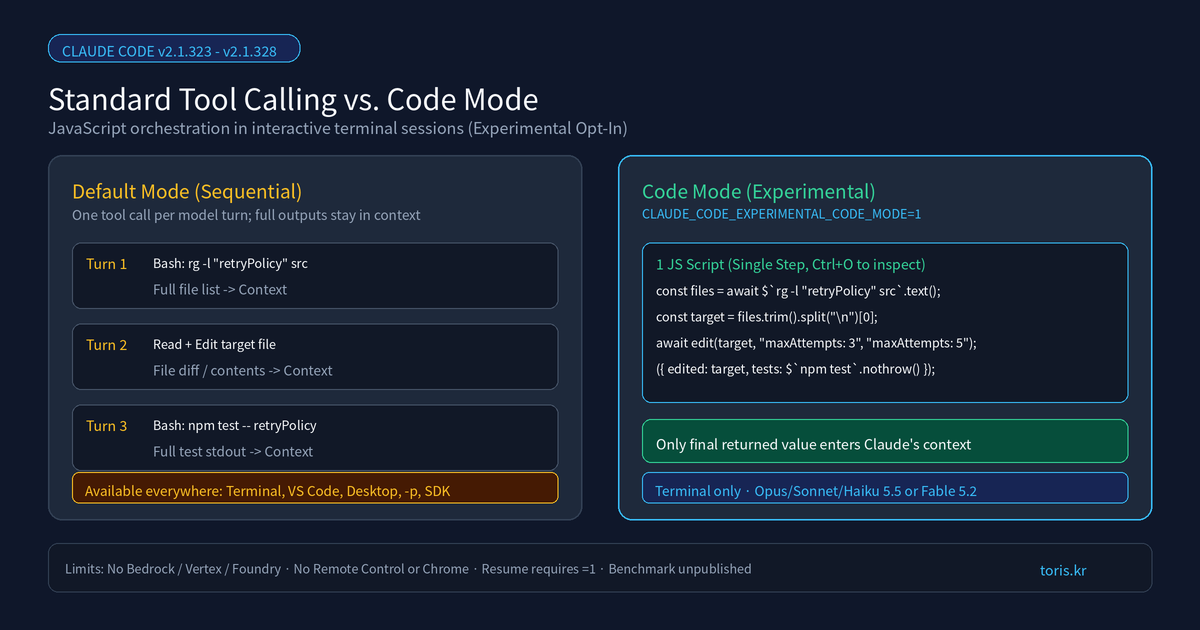
Q. What is Claude Code's experimental Code Mode, and when should you enable it? Code Mode is an experimental setting where Claude writes JavaScript to run multiple tool calls in parallel or sequence in a single step, returning only the output it needs to read. It cuts round-trips and intermediate context bloat when editing many files or filtering large search outputs.
⚠️ Accuracy guardrail: This post reflects Anthropic's official Code Mode documentation, Claude Code v2.1.323–v2.1.328 release notes on GitHub, and the official changelog checked on November 19, 2026. Because the feature is experimental, behavior may change or be removed in any release. The often-quoted "37% token reduction" comes from Anthropic's earlier API Programmatic Tool Calling post—Anthropic has not published a Code Mode token benchmark, and we did not run a large-scale production benchmark ourselves.
30-second summary
- How it works: Setting
CLAUDE_CODE_EXPERIMENTAL_CODE_MODE=1lets Claude generate a JavaScript block using helpers like$andedit(), returning only the final evaluated result to context. - Latest v2.1.328 updates: Released on November 19, 2026, v2.1.328 removes a 0.75-second post-script pause in auto/bypass modes, improves MCP prompt caching, and trims tool descriptions.
- Requirements: Native build v2.1.323+ (v2.1.326+ with agent teams), interactive terminal sessions only, and Claude Opus/Sonnet/Haiku 5.5 or Fable 5.2.
- Key limits: Not available on Bedrock, Vertex, Foundry, VS Code panels, Desktop,
-p, or Remote Control/Chrome; resuming a session requires keeping the variable set to1.
How Code Mode changes tool execution
Without Code Mode, Claude requests one tool call per turn—such as Bash, Read, or Edit—and ingests every intermediate output into context before deciding the next step. With Code Mode enabled, Claude writes a JavaScript snippet that runs commands concurrently, passes one result into the next call, and returns only what it actually needs to read.
In the terminal UI, you still see normal tool diffs rather than raw scripts; pressing Ctrl+O opens the transcript viewer where each snippet appears as a collapsed Code row. Much like the context-saving goal we examined in Caveman Audited, Code Mode trims wasted tokens—except it restructures tool orchestration rather than prompt phrasing.
| Aspect | Default Mode | Code Mode (Experimental) |
|---|---|---|
| Tool invocation | One call per turn, sequential | JS snippet running parallel or chained calls |
| Context payload | Every full tool output | Only the final value returned by JS |
| Permission & hooks | Checked per tool call | Still checked per call + pre-run code review in auto mode |
| Runtime cap | Standard per-tool limits | 10 minutes waiting; up to 2 hours in auto/bypass background |
| Supported surfaces | Terminal, VS Code, Desktop, -p, SDK |
Interactive claude terminal session only |
How to turn it on and what you need
You can enable Code Mode per session in your shell with CLAUDE_CODE_EXPERIMENTAL_CODE_MODE=1 or persistently in ~/.claude/settings.json. Claude Code ignores this variable in project-level settings files so cloned repositories cannot turn it on without your consent.
# 1) Check version (v2.1.323+ required; v2.1.326+ for agent teams)
claude --version

# 2) Start a single session with Code Mode enabled
CLAUDE_CODE_EXPERIMENTAL_CODE_MODE=1 claude
{
  "env": {
    "CLAUDE_CODE_EXPERIMENTAL_CODE_MODE": "1"
  }
}
On first launch, confirm Yes, turn on Code Mode to see the banner Code Mode (experimental) is on · this session can be resumed only with Code Mode on. You must use Claude Opus 5.5, Sonnet 5.5, Haiku 5.5, or Fable 5.2 via a Claude subscription or Console account—gateways, Bedrock, Google Cloud Agent Platform, Microsoft Foundry, HIPAA/ZDR orgs, and sessions with DISABLE_TELEMETRY or OpenTelemetry export enabled cannot start Code Mode.
Permission checks and v2.1.328 improvements
Even inside a JavaScript block, every underlying tool call still passes through your deny/ask rules and PreToolUse hooks under its normal tool name. In auto mode, however, the classifier reviews the generated script before execution rather than individual runtime calls, so keep explicit rules or hooks for dynamic paths you must guard.
Between v2.1.323 on November 12 and v2.1.328 on November 19, Anthropic shipped rapid reliability fixes. Version 2.1.328 eliminates a 0.75-second delay after most scripts in auto and bypass modes, improves prompt caching for sessions with MCP servers, shortens tool descriptions, and moves script output redaction from UserPromptSubmit hooks to PostToolUse hooks with updatedToolOutput.
Pitfalls to watch and the "37% savings" myth
Many posts cite a "37% token reduction" for Code Mode, but that figure comes from Anthropic's November 2025 API Programmatic Tool Calling article, not a Code Mode study. Since no official Code Mode benchmark exists yet, evaluate speed and token usage directly on your own repository.
Also note that any session started in Code Mode can only be resumed (claude --resume or --continue) while CLAUDE_CODE_EXPERIMENTAL_CODE_MODE=1 stays set. You also lose Remote Control, Claude in Chrome, computer use, and Desktop session handoff—so keep Code Mode off when those workflows matter.
Toris's take
When to turn it on: Enable it in interactive terminal sessions for multi-file refactors, search-and-filter debugging across large repos, or running independent lint, build, and test commands concurrently—especially on v2.1.328+.
When to skip it: Stick to default mode if you rely on Chrome control, Remote Control, Bedrock/Vertex/Foundry gateways, non-interactive -p scripts, or moving sessions to the Desktop app. For more on how Toris evaluates AI tooling, see our process page and OpenAI GPT-6.2 Astra vs. Sol comparison.
Sources
Advertisement