Google Gemini Tasks Free in Korea: Free vs. Pro/Ultra Guide
A breakdown of Google Gemini Tasks' free rollout in six countries including South Korea: Free/AI Plus vs. Pro/Ultra schedule limits, browser isolation, and U.S.-first feature gaps.
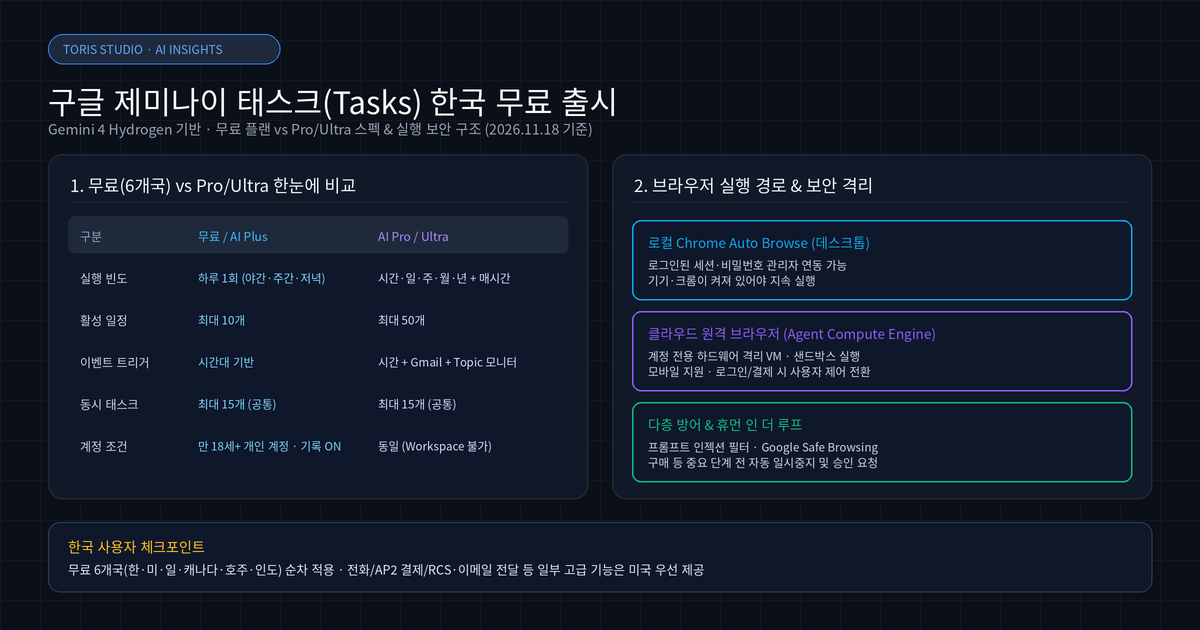
Q. Is Google Gemini Tasks free in South Korea, and how does it differ from Pro/Ultra? Based on Google's official November 17–18, 2026 announcement, personal Google Accounts (age 18+, History on) in six countries—including South Korea, the U.S., Japan, Canada, Australia, and India—can use Gemini Tasks without a Google AI subscription. However, free and Google AI Plus plans are capped at once-a-day runs within a general window (overnight, daytime, or evening) and up to 10 active schedules, whereas hourly triggers, Gmail/Topic monitors, and 50 active schedules require Google AI Pro or Ultra.
⚠️ Accuracy guardrail: This post is based on Google's official blog announcements (Nov 17, 2026 EN / Nov 18, 2026 KR) and Gemini Apps Help docs (
answer/17094507,answer/17094710) as of November 19, 2026. Exact rollout timing per account in Korea, compute usage limits, and expansion schedules for U.S.-first features (phone calls, AP2 checkout, RCS texting, and forwarding emails togemini@google.com) are subject to Google's updates.
30-second summary
- Free rollout in 6 countries including Korea: Powered by Gemini 4 Hydrogen, Task mode and basic scheduled workflows are rolling out free of charge in South Korea, the U.S., Japan, Canada, Australia, and India (personal account 18+, History on).
- Free vs. Pro/Ultra: Free and AI Plus allow up to 1 run per day (overnight, daytime, or evening window) and 10 active schedules; AI Pro/Ultra unlocks hourly intervals, Gmail/Topic monitors, and up to 50 active schedules.
- Execution & security: On desktop, Gemini switches between local Chrome auto browse and a cloud remote browser inside a dedicated hardware-isolated VM (Google Cloud Agent Compute Engine); mobile uses only the remote browser.
- Limitations: Scheduled monitors are not built for second-level tasks like live ticket drops or fast-moving stock prices, and several headline features remain U.S.-first.
1. What Gemini Tasks are and why they went free
Gemini Tasks turn the chat box into an agent workflow mode that browses the web, builds files, and runs scheduled routines in the background. On November 17, 2026 (November 18 in Korea), Josh Woodward, VP of Labs, Gemini app, and AI Studio, announced that the Gemini 4 Hydrogen task update is rolling out free to hundreds of millions of users across six countries.
Instead of one-off Q&A, flipping the home-screen toggle from Chat to Task lets Gemini combine Connected Apps, skills (@ or /), Personal Intelligence, location, and signed-in web sessions. Official examples include archiving or unsubscribing from newsletters, tracking flight and hotel prices within a budget, and packaging cited research into downloadable PDFs, documents, spreadsheets, and slides.
2. Free / AI Plus vs. Google AI Pro / Ultra specs
The real dividing line is run frequency and event triggers. According to Gemini Apps Help (answer/17094710), free users and Google AI Plus subscribers can schedule tasks up to once a day during a general time window (overnight, daytime, or evening). Google AI Pro and Ultra add exact-time and hourly schedules plus Gmail filter monitors and Topic monitors for news, finance, sports, and local events.
| Item | Free / Google AI Plus | Google AI Pro / Ultra | Notes (Official Help) |
|---|---|---|---|
| Supported regions | US, Korea, Japan, Canada, Australia, India | Supported regions (excl. EEA, UK, Switzerland, Nigeria) | Pro/Ultra needed outside the 6 countries |
| Account eligibility | Personal Google Account (18+), History on | Same | Not available on work/school Workspace accounts |
| Run frequency | Once a day (overnight, daytime, evening) | Once, hourly, daily, weekly, monthly, yearly | Multi-run & exact times require Pro/Ultra |
| Event triggers | None (time-window only) | Gmail monitors & Topic monitors | Not ideal for live ticket drops or fast tickers |
| Active schedules | Up to 10 | Up to 50 | Completed schedules can only be deleted |
| Concurrent tasks | Up to 15 | Up to 15 | Skipped if compute usage limit is reached |
Just as we found when evaluating agent routing in OpenAI GPT-6.2 Astra vs. Sol and Caveman Token Compression Audit, cadence and trigger precision decide how much value you get. For a single daily briefing or weekly research digest, the free tier's 10-schedule cap is enough to start.
3. Local Chrome vs. cloud remote browser security
Gemini alternates between desktop Chrome auto browse and a hardware-isolated cloud VM depending on device availability. Per Help documentation (answer/17094507), desktop tasks can use Chrome auto browse with your signed-in sessions and Google Password Manager, provided your computer and Chrome stay awake. If the device sleeps—or when starting from mobile—Gemini uses a cloud remote browser instead.
Google states that cloud tasks run inside a dedicated, hardware-isolated VM on Agent Compute Engine (not shared across users), protected by sandbox isolation, prompt-injection filters, and Google Safe Browsing. Before sensitive actions such as clicking "buy," Gemini pauses for user confirmation, and users are instructed never to type passwords or payment details directly into the task thread—instead taking control of the browser session to enter them directly.
4. Constraints Korean users should check first
Separate the global free rollout from U.S.-first capabilities. Features highlighted in the blog post—such as calling local dealerships, Agent Payments Protocol (AP2) checkout via Google Pay, forwarding emails to gemini@google.com, and texting Gemini over RCS—are rolling out starting in the U.S. What Korean free users get immediately on web (gemini.google.com), mobile, and Mac is Task mode, file/research generation, and once-daily time-window schedules (up to 10 active).
Also note timing variance: Google explicitly warns that scheduled task run times are approximate and can be delayed or skipped during high traffic or when an account hits its compute-based usage limit.
Toris's take
For solo developers and operators, the best starting point on the free tier is once-a-day synthesis: compiling daily industry research into a PDF, tidying newsletter clutter, or drafting morning prep notes fits comfortably within 10 active schedules and one daily window.
If your workflow depends on hourly polling, Gmail filter triggers, or exact-minute execution, the free tier's broad time windows (overnight, daytime, evening) will feel restrictive. At that point, either upgrade to Google AI Pro/Ultra or run a deterministic cron/API pipeline. If you want help designing reliable automation pipelines, check out Toris Studio Services.
Sources
- Put Gemini to work for you (Korean) — Google Korea Blog (Nov 18, 2026)
- How to use Tasks in Gemini for personal assistance — Google Blog (Nov 17, 2026)
- Manage your tasks & workflows in Gemini Apps — Gemini Apps Help
- Create & manage schedules for tasks in Gemini — Gemini Apps Help
- Toris Studio YouTube Shorts — Gemini Tasks Free Launch in Korea
Advertisement