T3 Code Guide: Control Claude Code and Codex from Your Phone
How pingdotgg/t3code runs your local Claude Code, Codex, and Cursor logins with T3 Connect or LAN/Tailscale remote approval, Git worktrees, and four permission modes.
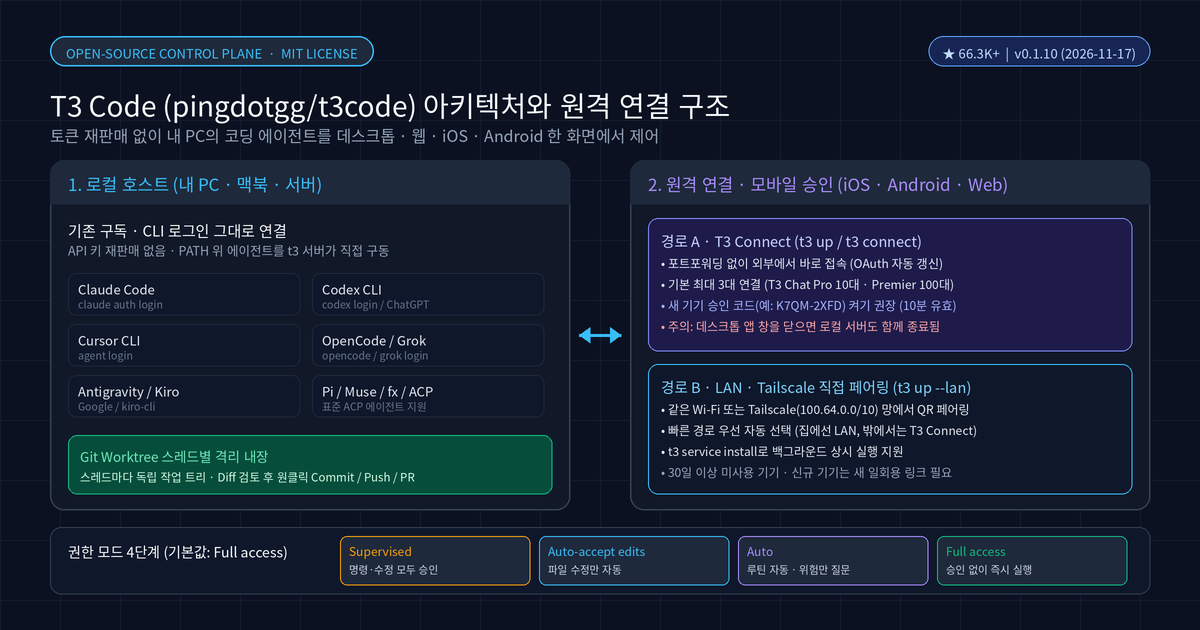
Q. How is T3 Code (pingdotgg/t3code) different from other AI coding editors or CLIs? T3 Code does not resell tokens or API credits. It is an MIT-licensed open-source control plane that drives the coding agents already installed and signed in on your machine—including Claude Code, Codex, Cursor, and OpenCode—from one fast desktop, web, iOS, and Android interface.
⚠️ Accuracy guardrail: This post reflects what we directly verified on November 20, 2026 in the
pingdotgg/t3codeGitHub repository (66,397+ stars; latest stable release v0.1.10 and November 19 Nightlyv0.1.11-nightly.20261119.4954) and official docs (install.md,remote-access.md,permission-modes.md). Because it is still in the 0.1.x series, CLI flags and provider support move quickly, and iOS TestFlight is invite-only.
30-second summary
- No token reselling: T3 Code runs the CLI and ACP agents you already pay for and authenticate locally—such as Claude Code (
claude auth login), Codex (codex login), and Cursor (agent login). - Start at your desk, approve from your phone: Keep a thread running on your PC or Mac, then approve commands or review Git diffs from iOS, Android, or the web via T3 Connect or LAN/Tailscale pairing.
- Built-in Git worktrees: Each thread can run in its own worktree, letting you inspect diffs, commit, push, and open a pull request with a single click.
- Four permission modes: Choose
Supervised,Auto-accept edits,Auto, orFull access(initial default) per thread or project.
Why T3 Code topped GitHub Trending
T3 Code surged to the top of GitHub Trending because it unifies the coding agents already sitting on your machine instead of forcing another subscription. As of November 20, 2026, pingdotgg/t3code has 66,397 stars and 11,579 forks on GitHub.

Its README summarizes the pitch in one line: "What are you selling me? Nothing." While tools like the Codex desktop app, Claude Desktop, and Cursor keep you inside a single vendor's workflow, T3 Code lets you switch models mid-thread or hand a task from Claude to Codex directly on your local host.
Q. Do I need a separate paid plan or API key to use T3 Code? No. T3 Code itself is free MIT-licensed software. It uses the local subscriptions and CLI logins already configured on your
PATH, including Claude Code, Codex, Cursor, OpenCode, Grok Build, Antigravity, Kiro, Pi, Muse Code, and fx.
Supported agents and installation
You can install T3 Code as a desktop app (macOS, Windows, Linux) or as the t3 CLI. Before starting a thread, at least one provider CLI must be installed and authenticated on the host machine.
| Target | Command or source | Notes |
|---|---|---|
| macOS desktop | brew install --cask t3-code |
Apple Silicon and Intel |
| Windows desktop | winget install T3Tools.T3Code or scoop install extras/t3code |
Remote Windows service updates added in v0.1.10 |
| Linux desktop | yay -S t3code-bin, Nix, or .deb release |
Separate t3code-nightly-bin package on Arch |
| CLI (macOS/Linux) | curl -fsSL https://t3.codes/install.sh | sh |
Installs t3 to ~/.local/bin |
| Try once (no install) | npx t3@latest |
Requires Node.js; runs the latest stable release |
| Mobile apps | App Store (iOS) · Google Play (Android) | Connects to your host via T3 Connect or LAN/Tailscale |
Provider sign-ins stay unchanged: claude auth login for Claude Code, codex login (or ChatGPT sign-in) for Codex, agent login for Cursor (cursor-agent binary), and opencode auth login for OpenCode. Once authenticated, toggle the provider in Settings → Providers. If you already use parallel worktree setups, compare this workflow with our Orca(stablyai/orca) Git Worktree orchestrator guide.
Remote approval from your phone: T3 Connect vs. LAN and Tailscale
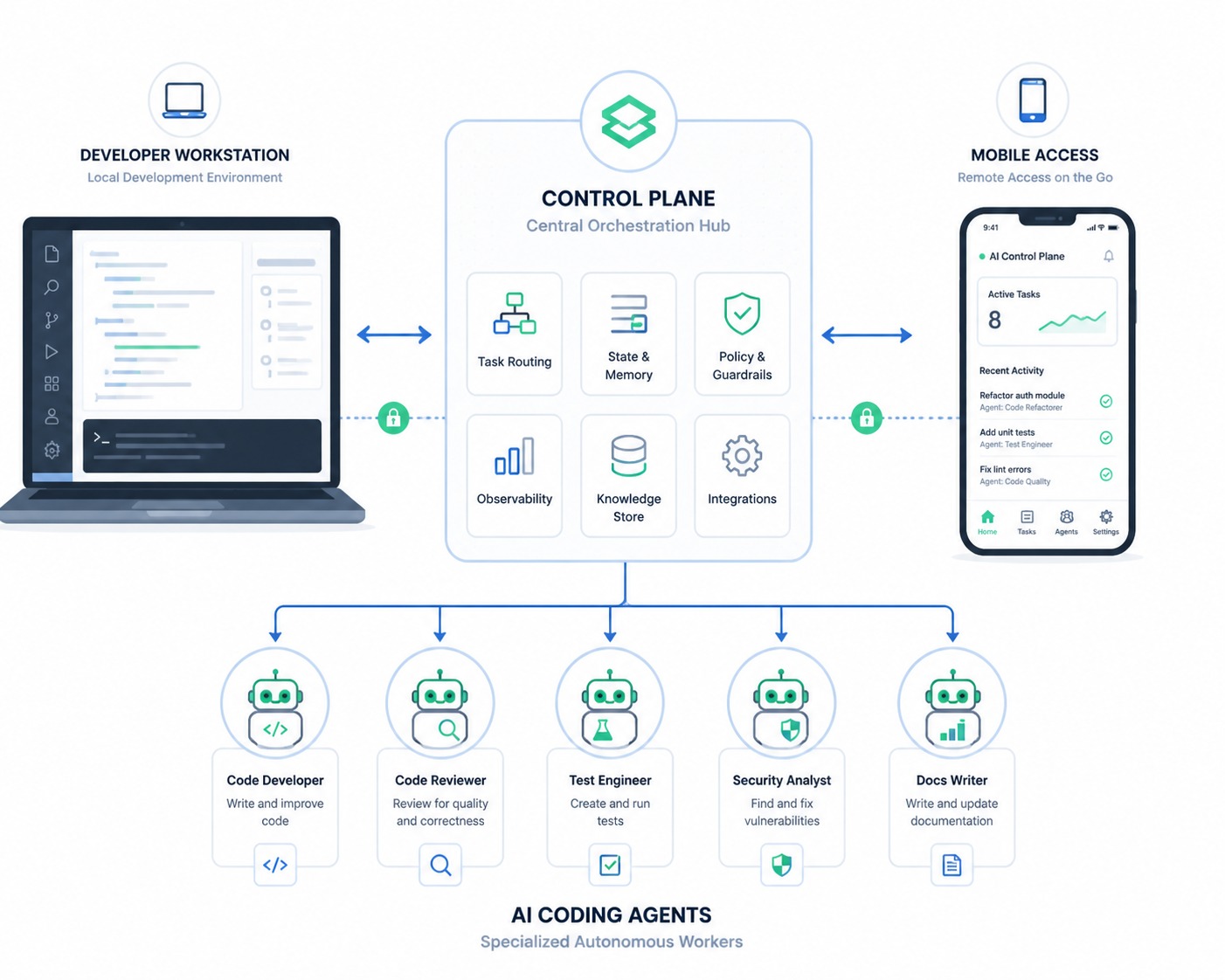
To continue or approve work from a phone or another computer, the host machine must stay powered on and reachable. T3 Code provides two main remote paths.
| Comparison | Path A: T3 Connect (t3 up / t3 connect) |
Path B: LAN / Tailscale pairing (t3 up --lan) |
|---|---|---|
| Network setup | No router port forwarding required | Requires same local Wi-Fi or Tailscale (100.64.0.0/10) |
| Pairing flow | Sign in with the same T3 Connect account (code approval over SSH) | Scan QR code or paste one-time t3 pair URL |
| Machine limit | Up to 3 machines (10 on T3 Chat Pro, 100 on Premier; phones excluded) | Direct host connection with no account machine cap |
| Security guard | Optional Require approval for new devices (K7QM-2XFD, 10m TTL) |
One-time pairing token (re-pair required after 30 days idle) |
| Routing behavior | Renews OAuth credentials automatically without dropping active chats | Learns LAN and Tailscale routes and tries fastest route first |
One operational detail matters immediately: closing the last desktop app window stops its local server. If you want to approve tasks while away from your desk, run t3 up or t3 service install in the terminal so the background service stays alive. Also enable Require approval for new devices under Settings → Sharing & access so an account compromise alone cannot open your host.
Four permission modes and provider differences
T3 Code controls how much autonomy an agent has per thread through four permission modes (Full access by default, switchable via mod+shift+a or the model picker's Permissions menu).
- Supervised: Prompts for approval on both shell commands and file edits—the safest choice when approving from a phone.
- Auto-accept edits: Applies file edits automatically while still asking before running commands.
- Auto: Uses the provider's automatic review for routine steps and asks on risky actions. Codex, Claude, Cursor, Grok, and fx support automatic review; OpenCode and Antigravity fall back to prompting.
- Full access: Runs commands and edits without prompts. Even here, Claude still asks if its settings block bypass permissions or trigger a dangerous-removal check.
For deeper details on Claude Code's own tool-execution updates, see our Claude Code Code Mode Guide and v2.1.328 updates.
Toris's take
Adopt T3 Code right away if you switch between two or more coding CLIs (such as Claude Code, Codex, and Cursor) or want to kick off work at your desk and approve diffs and PRs from your phone without paying any token markup.
Hold back or keep strict guardrails on production hosts and sensitive company repositories. Because v0.1.x iterates rapidly, start with Supervised mode, turn on Require approval for new devices, and run t3 service install on a test repository before trusting it with critical branches.
Sources
- pingdotgg/t3code GitHub repository
- T3 Code Install Guide (docs/user/install.md)
- T3 Code Remote Access Guide (docs/user/remote-access.md)
- T3 Code Permission Modes Guide (docs/user/permission-modes.md)
- T3 Code v0.1.10 Release Notes
- T3 Code Nightly 0.1.11-nightly.20261119.4954
- Toris Studio YouTube — GitHub Trending Open Source TOP 10 (Nov 18)
Advertisement